Zillow Showcase Step by Step: How It Works, What the Numbers Say, and When to Use It


Most agents have seen a Showcase listing and wondered what the agent behind it did differently. The short version: Showcase is a paid Zillow upgrade that wraps your listing media in a richer layout, and it only works when the right media is delivered the right way. Here is the whole process in order, what Zillow's own numbers do and do not prove, and a simple way to decide which listings deserve it.
Two Jobs, Two People
Showcase splits the work between you and your photographer, and most delays come from mixing the two up.
You handle the Zillow side. You add the listing in your Zillow workspace, pay for it (a Showcase listing credit, your own payment method, or a credit from a seller connection, depending on your account), and tell Zillow who your photographer is.
Your photographer handles the media side. Zillow requires HD photos, a virtual tour and an interactive floor plan, and says this takes photographers with specific equipment and training. The photographer gets a request from Zillow and uploads the finished media to your listing.
That is exactly what our Showcase packages are built for. The Essentials Showcase package is the minimum that meets Zillow's media requirements: professional photos, a 3D tour and a floor plan, delivered in one visit. When the listing is going to Showcase, choose the Zillow option for the 3D tour. Premium Showcase and Cinematic Showcase build on that foundation with drone photos, reels and a filmed property video.
When that media arrives, the listing converts from standard to Showcase. You are not waiting on Zillow to "approve" anything extra. You are waiting on the delivery.
The Order Process, in Plain Steps
- Log in to your Zillow workspace and add the listing. Choose "Add listing," enter the address and the listing agent whose details should appear on the page. Seller contact details are optional.
- Order Showcase. Click "Order Showcase & media," enter the list price and choose how you are paying.
- Choose Agents Choice Media as your company. Zillow shows you a list of photography companies. Look for Agents Choice Media under "Photography companies you know," which is where Zillow places providers you have worked with before (answer "Yes" when it asks if you have received media from a photographer before). Click "Send Media Request" and Zillow notifies us. If we are not in that list, use "Invite photographer," enter hello@agentschoicemedia.com, and we will accept the request on our end. Then add the property address, pick the services and choose a date.
- Photographer delivers. They receive a link by email and upload to your listing. The status in your account shows where things stand, such as "Media request pending."
- Review and publish. Check the featured photos, the room labels and the floor plan, then go live through your MLS as usual.
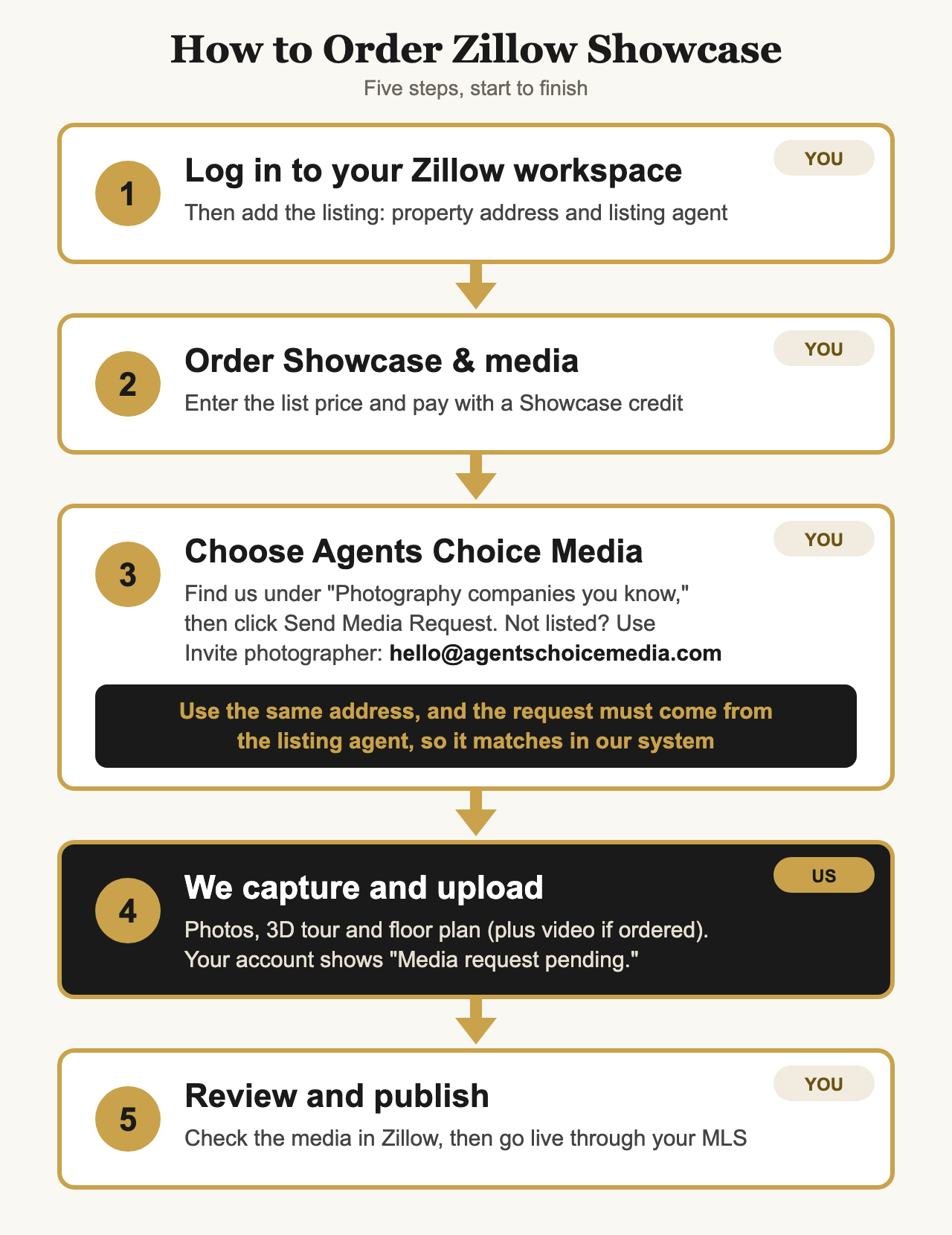
One detail that speeds up delivery: you must use the same property address as your booking with us, and the request must come from the listing agent, so it matches in our system. When it matches, the request lines up with your order on its own, and your Showcase media can be delivered faster. A different spelling, a missing unit number or a request sent by someone other than the listing agent can hold it up while we sort out which order it belongs to.
Booking the 3D tour and floor plan on day one is the single easiest way to avoid a second appointment. A tour cannot be built from regular photos after the fact, because it needs its own on-site capture.
Can You Upgrade a Live Listing to Zillow Showcase?
Yes. You do not have to decide before the listing goes live. Zillow lets you flip an existing listing to Showcase, and the steps are close to a new order:
- Start the order. Log in to your Zillow workspace, click "Order Showcase & media," and enter the address of the listing you want to upgrade.
- Use a Showcase credit. An upgrade costs a credit like any other Showcase listing. Use one you already have or buy a new one.
- Tell Zillow about the media. It asks whether you still need to order the media. If you do, choose "Yes, I need to order the media," and select Agents Choice Media as your company, exactly as in step 3 above.
- Invite us as your photographer. If we are not already connected to the address, Zillow asks for the photographer's email. Enter hello@agentschoicemedia.com. Use the same address as your booking, and make sure the request comes from the listing agent so it matches in our system. You will see "Media request pending" while we capture and upload your media.
- We deliver, the listing switches. Once we upload the finished photos, 3D tour and floor plan, the listing moves from a standard listing to a Showcase listing.
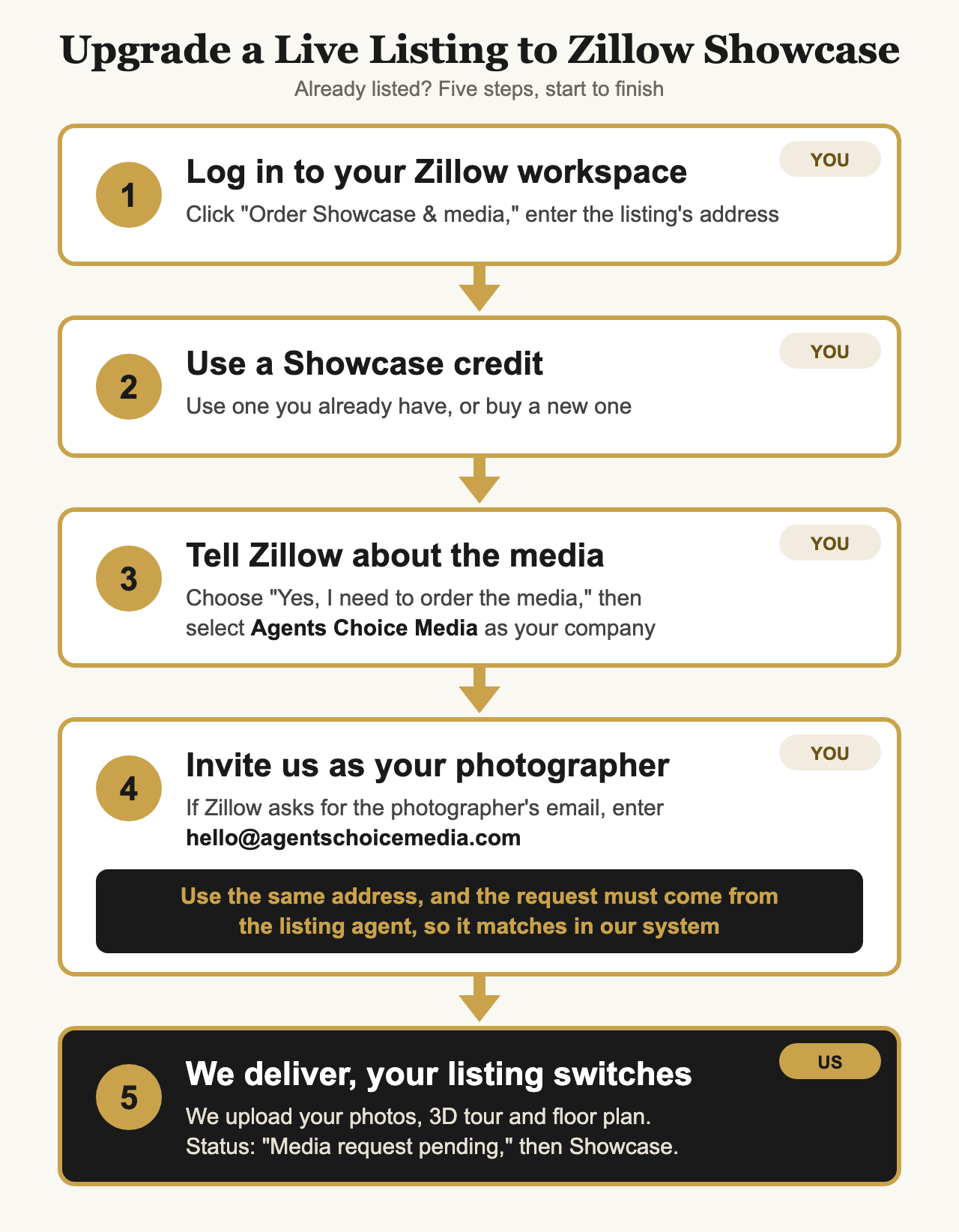
If you already have qualifying media from a photographer connected to the property, pick "No, I have all the required media" and Zillow will show it for you to select. A tour cannot be added to regular photos after the fact, so if the original shoot had no 3D tour and floor plan, we will need to visit the home again.
This matters when a listing is a few weeks old and online interest has gone quiet. Before the price-reduction conversation, a media upgrade is a reasonable first step to discuss with your seller. Upgrading cannot fix a price that is wrong, but it can fix a listing that is not being noticed.
What Zillow's Numbers Say (and What They Do Not)
Zillow publishes a "Fast Facts" page for Showcase, last updated July 2026. Here are the headline figures, in Zillow's words reduced to the essentials:
- Active Showcase listings averaged 84% more page views, 77% more saves and 93% more shares than similar nearby non-Showcase listings.
- Showcase listings were 10% more likely to go pending in the first 14 days.
- Showcase listings sold for 2%, or about $7,000, more on average than similar non-Showcase listings.
- Agents using Showcase on more than half of their listings won 35% more listings than comparable agents without it.
- Listings that were switched to Showcase later saw 85% more page views, 72% more saves and 67% more shares in the following seven days, compared with the seven days before.
Read these with care. They are Zillow's own comparisons, and they show a pattern, not a promise. Showcase listings may also differ in ways the matching cannot capture, such as agents who already invest more in marketing. Zillow itself noted that Showcase listings were under 1% of its listings when it published the sale price comparison, so the sample is small. Treat the numbers as a good reason to try it on the right listing, not a guarantee of a result on yours.
Showcase Video: The Rules That Trip People Up
Showcase added a video slot to the listing carousel, right after the first photo. We cover that feature on its own in Zillow Showcase Video: What It Is and How to Get Your Listing Approved. Zillow's requirements, as published for photographers:
- 120 seconds or less, horizontal or vertical.
- Uploaded as a file by the same photographer who delivered the other Showcase media, through Aryeo. Links and embeds do not count.
- Property focus only. No brokerage ads, no recruiting, no watermarks.
- Licensed music only.
- Agent on camera is fine, with an introduction of yourself and your brokerage. Branding beyond that introduction is not allowed.
- Voiceover is optional.
- First video uploaded is the one that gets used.
The practical lesson: hire a Zillow-approved Showcase media provider for the whole package. Zillow's own name for the providers it vets is "Showcase Select," shown as a tag on their profile, and any provider should be able to tell you plainly that they are approved to deliver Showcase media. Then keep everything with that one provider, because a video from a different videographer will not qualify. We deliver through Aryeo as part of our standard process, so the upload requirements are handled for you.
Should This Listing Be a Showcase Listing?
Use a quick scorecard. The more you can answer yes to, the stronger the case:
- Is it in a price band with many similar listings nearby?
- Does it have a feature that needs strategy to show, like a tricky layout, a view or a pool?
- Do you want a stronger story for your listing presentation, not just this one sale?
- Can you respond quickly when buyers contact you through the listing?
- Is the budget there for both the Showcase credit and the media?
If most answers are no, strong photos, a floor plan and a 3D tour will still carry the listing well. Showcase is an upgrade on top of good media, not a substitute for it.
What It Costs
Two separate costs apply: the Showcase credit, which you arrange with Zillow, and the media, which your photographer delivers. Zillow's pricing varies by account and market, so confirm it with Zillow directly. For our side, get an instant quote and you will see the media price before you commit.
Why Insurance Belongs in the Conversation
A Showcase shoot is a longer visit than a standard one. The 3D capture alone means more time moving through the home with equipment, and often a drone for the exterior. Every shoot we run carries $2M in general liability and $2M in aircraft liability insurance, so your seller's home and your reputation are covered from the first frame. It is worth asking any provider for proof before you book.
How to Contact Zillow for Showcase Support
Some things only Zillow can fix, like a Showcase credit that looks wrong or a listing that did not update. Zillow's Showcase customer service team can be reached here (hours as Zillow lists them, in EST):
- Phone: 888-367-4009. Monday to Friday, 8:00 AM to 10:00 PM. Saturday and Sunday, 9:00 AM to 6:00 PM.
- Email: support@zillow-workspace.com, answered Monday through Sunday.
- Your account manager, if you have one, is the other route Zillow points to for credit problems.
Three things Zillow says are worth knowing before you call:
- Check the address before you finalize. Once a Showcase credit is used on a listing, Zillow does not refund it. Make sure it is going to the right property.
- Try not to edit a live Showcase listing. You can, but Zillow has seen cases where edits made after posting did not carry through between the MLS and Showcase. If that happens, contact support.
- If the Showcase version is not showing up properly, the usual cause is an unfinished MLS entry. Make sure the listing is live in your MLS with all the media and the tour and floor plan links added.
For anything about the photos, tour, floor plan or video themselves, call us first. We will sort it out with you, and with Zillow when it needs their side.
Frequently Asked Questions
Related Reading
Planning a Showcase listing in the Atlanta area? We deliver the photos, 3D tour, floor plan and video the way Zillow requires, in one visit. See Signature Property Film or get an instant quote.
Get an Instant Quote